
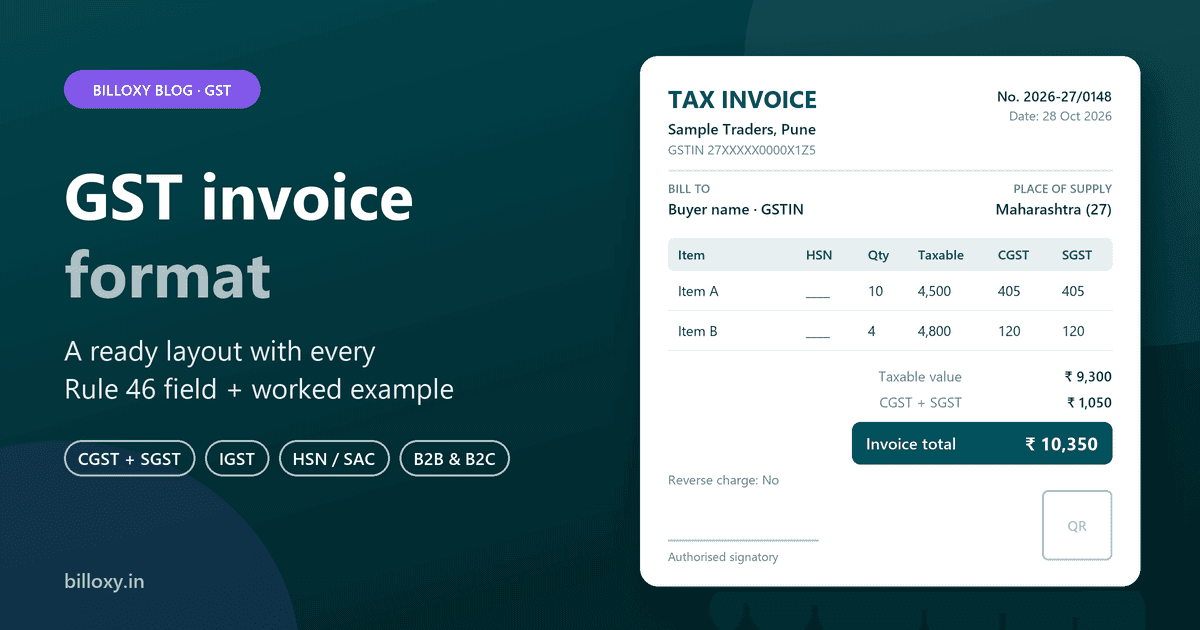
A GST invoice format is the layout of a tax invoice that shows everything Rule 46 of the CGST Rules asks for: the supplier's name, address and GSTIN, a unique invoice number and date, the buyer's details, HSN or SAC codes, quantity, taxable value, the GST rate and amount (CGST + SGST, or IGST), place of supply and a signature.
Make one now: fill in your shop and customer details in the free Billoxy GST invoice builder. It splits CGST, SGST or IGST from the two states and saves the invoice as a PDF or image, with no sign-up.
Updated 28 October 2026. This guide is for Indian shop owners, traders and service businesses who bill GST-registered and walk-in customers. It gives a layout you can copy into Excel, Word or a printed bill book, the field rules behind it, and a worked example. It is not tax advice; for your own case, check with your chartered accountant.
What does a GST invoice format look like?
A GST invoice has five blocks, top to bottom. Copy this layout into a spreadsheet, a Word table or your printer's bill-book design.
Block 1: header
| Field | What to write |
|---|---|
| Title | "Tax Invoice" |
| Supplier name and address | Your registered business name and the address on your GST registration |
| Supplier GSTIN | Your 15-character GSTIN |
| Invoice number | A serial number of up to 16 characters, unique for the financial year (for example 2026-27/0148) |
| Invoice date | The date you issue it |
| Copy marking | "Original for recipient" (and duplicate or triplicate copies, see below) |
Block 2: buyer and delivery
| Field | What to write |
|---|---|
| Bill to | Buyer's name and address |
| Buyer GSTIN | If the buyer is registered |
| Place of supply | State name and its state code for an inter-state sale |
| Ship to | Delivery address, if it is different from the place of supply |
Block 3: item table
| Sr. | Description | HSN / SAC | Qty | Unit | Rate (₹) | Discount (₹) | Taxable value (₹) | GST rate | CGST (₹) | SGST (₹) | IGST (₹) | Total (₹) |
|---|---|---|---|---|---|---|---|---|---|---|---|---|
| 1 | ||||||||||||
| 2 |
Use the CGST and SGST columns for a sale inside your state, and the IGST column for a sale to another state. Leave the unused columns blank or hide them.
Block 4: tax summary
| Line | Amount (₹) |
|---|---|
| Total taxable value | |
| Total CGST | |
| Total SGST | |
| Total IGST | |
| Invoice total | |
| Amount in words | |
| Tax payable on reverse charge? | Yes / No |
Block 5: footer
- Bank or UPI details for payment (optional, but it helps you get paid)
- Terms, such as the payment due date (optional)
- Signature or digital signature of the supplier or an authorised person
- QR code with the IRN, only if your business must issue e-invoices
Which fields must a GST invoice have?
Rule 46 of the CGST Rules lists the particulars of a tax invoice. Here they are in plain words, with when each applies.
| Rule 46 field | When it applies |
|---|---|
| Supplier name, address and GSTIN | Always |
| Consecutive serial number, up to 16 characters (letters, numbers, "-" and "/"), unique for the financial year | Always. One or more series are allowed |
| Date of issue | Always |
| Buyer name, address and GSTIN or UIN | When the buyer is registered |
| Buyer name, delivery address, and state name and code | For an unregistered buyer when the taxable value is ₹50,000 or more, or when the buyer asks for it below that |
| HSN code (goods) or SAC (services) | Always, with the number of digits set by notification (see below) |
| Description of goods or services | Always |
| Quantity and unit (UQC) | For goods |
| Total value and taxable value after discount | Always |
| GST rate and tax amount (CGST, SGST/UTGST, IGST, cess) | Always |
| Place of supply with state name | For an inter-state supply |
| Delivery address | When it differs from the place of supply |
| Whether tax is payable on reverse charge | Always (write "Yes" or "No") |
| Signature or digital signature | Always, except on an electronic invoice issued under the IT Act |
| QR code with IRN | Only on e-invoices |
HSN digits. Notification 78/2020-Central Tax sets the minimum length from 1 April 2021. If your aggregate turnover in the previous financial year was up to ₹5 crore, show 4 digits on invoices to registered buyers; the code may be left out on invoices to unregistered buyers. Above ₹5 crore, show 6 digits on all tax invoices. Our guides to HSN codes and SAC codes explain how to find yours.
What is a sample GST invoice?
Here is a worked example with sample figures. The rates are examples only; use the rate that applies to your item.
A trader in Maharashtra (state code 27) sells two items to a registered buyer:
| Item | Qty | Rate (₹) | Taxable value (₹) | GST rate |
|---|---|---|---|---|
| Item A | 10 | 450 | 4,500 | 18% |
| Item B | 4 | 1,200 | 4,800 | 5% |
If the buyer is also in Maharashtra (intra-state sale), split each rate in half between CGST and SGST:
| Item | Taxable value (₹) | CGST (₹) | SGST (₹) | Line total (₹) |
|---|---|---|---|---|
| Item A | 4,500 | 405 (9%) | 405 (9%) | 5,310 |
| Item B | 4,800 | 120 (2.5%) | 120 (2.5%) | 5,040 |
| Total | 9,300 | 525 | 525 | 10,350 |
If the buyer is in Karnataka (state code 29, inter-state sale), charge the full rate as IGST and write "Place of supply: Karnataka (29)":
| Item | Taxable value (₹) | IGST (₹) | Line total (₹) |
|---|---|---|---|
| Item A | 4,500 | 810 (18%) | 5,310 |
| Item B | 4,800 | 240 (5%) | 5,040 |
| Total | 9,300 | 1,050 | 10,350 |
The invoice total is the same. Only the tax heads change, and the place of supply decides which one applies. See CGST vs SGST vs IGST and place of supply if you are unsure.
How is a B2B invoice format different from a B2C one?
| Point | B2B (registered buyer) | B2C (unregistered buyer) |
|---|---|---|
| Buyer GSTIN | Required | Not applicable |
| Buyer name and address | Required | Required when the value is ₹50,000 or more, or when the buyer asks |
| HSN code (turnover up to ₹5 crore) | 4 digits | May be left out |
| Buyer's input tax credit | The buyer claims ITC from your invoice, so every field must be right | No ITC for the buyer |
| Reported in GSTR-1 | Invoice-wise | Mostly in summary |
Rule 46 also lets a shop that sells to unregistered buyers who don't want an invoice issue one consolidated tax invoice at the end of the day for those sales. Most counter shops still print a bill for each customer, because customers ask for one.
Do I need a tax invoice, a bill of supply or a cash memo?
- Tax invoice: a regular GST-registered business charging GST. This is the format above.
- Bill of supply: a composition scheme dealer, or a supplier of exempt goods or services. It shows no GST. See GST invoice vs bill of supply.
- Cash memo: the everyday name for a simple counter bill. If you are GST-registered and charge GST, the bill must still carry the tax invoice fields above.
Other documents that look like invoices have their own formats: a proforma invoice before the sale, a delivery challan when goods move without a sale, and a credit note or debit note to correct an invoice.
How many copies of a GST invoice do I need?
Rule 48 sets the copies:
| Supply | Copies and markings |
|---|---|
| Goods | Three: "Original for recipient", "Duplicate for transporter", "Triplicate for supplier" |
| Services | Two: "Original for recipient", "Duplicate for supplier" |
These copy rules do not apply to an e-invoice prepared through the Invoice Registration Portal.
What changes in an e-invoice format?
If your business must issue e-invoices, you upload the invoice details to the Invoice Registration Portal and get an Invoice Reference Number (IRN). The invoice then carries a QR code with the IRN. An invoice issued without the IRN is not treated as a valid invoice for such a business. Our guide to e-invoicing under GST explains who is covered.
New from 1 January 2027: Notification 04/2026-Central Tax (26 October 2026) extends e-invoicing to self-invoices for purchases from unregistered persons taxed under reverse charge, and to import of services. It applies to businesses already notified for e-invoicing.
Excel, Word, a bill book or billing software: which should I use?
| Option | Good for | Watch out for |
|---|---|---|
| Printed bill book | A shop with a few handwritten bills a day | Totals and tax split by hand; no copy for your records unless you keep the carbon; no stock or sales report |
| Excel or Word template | Occasional B2B bills | Invoice numbers can repeat or skip; formulas break; HSN, state code and place of supply typed each time |
| Free online invoice builder | One-off bills and new businesses | One invoice at a time; no saved customers, items or stock |
| GST billing software | Daily billing, stock and returns | Monthly cost after the trial; a short setup of items and customers |
A template is fine to start. Once you bill every day, the risk is in the repetition: a skipped invoice number, a wrong state code that charges CGST and SGST instead of IGST, or an HSN code missing on a B2B bill. Those are the mistakes that cost your buyer their input tax credit.
How do I make a GST invoice in the free Billoxy builder?
- Open the free GST invoice builder. No sign-up is needed.
- Enter your company name, phone, address, GSTIN and state. Add a logo if you want.
- Enter the customer's name, phone, address, GSTIN (if registered) and state.
- Add each product with quantity, price and GST %. The builder shows CGST and SGST when both states match, and IGST when they differ.
- Add terms and a signature. The builder fills in an invoice number for you; keep your own series consistent for the year.
- Save the invoice as a PDF or an image, or share it on WhatsApp or by email.
The free builder does not have an HSN column, and it does not save your past invoices. For HSN/SAC codes on every line and invoices you can find again, use Billoxy itself.
Common mistakes in a GST invoice format
- Repeating or restarting invoice numbers mid-year. The series must be unique for the financial year.
- Charging CGST + SGST on an inter-state sale (or IGST on a local one). Check the buyer's state code.
- Leaving out the buyer's GSTIN on a B2B bill. The buyer cannot claim credit without it.
- No HSN code, or too few digits, on B2B invoices.
- Missing "reverse charge: Yes/No" and the place of supply on inter-state bills.
- Using "Tax Invoice" as a composition dealer. Composition dealers issue a bill of supply.
How Billoxy helps
Billoxy is GST billing, invoicing and inventory software for Indian MSMEs, on web and mobile. On the GST & GSTR feature:
- HSN/SAC codes and GST rates sit on your saved items, so every invoice line carries them.
- GST is applied line by line on sales and purchase invoices, as CGST, SGST or IGST.
- Sales invoices feed the sales summaries, and GSTR-1, GSTR-3B and GSTR-4 files are created from Reports.
- E-invoices with an IRN are generated from sales invoices through the Iris GST portal flow on the e-invoice feature.
Invoice creation takes under 5 seconds once your items and customers are saved. Start the 10-day free trial to bill with your own format, or keep using the free invoice builder for one-off bills.
Frequently asked questions
Is there one official GST invoice format?
No. The law lists the fields a tax invoice must contain (Rule 46), not a fixed design. Any layout is valid if it shows all the required fields.
Can I make a GST invoice in Excel?
Yes. Excel or Word is fine if every Rule 46 field is there, invoice numbers stay unique for the year, and the tax split is right. Many businesses move to billing software once they bill daily, to avoid repeated typing and numbering errors.
Is a handwritten GST invoice valid?
Yes, if it carries all the required fields and a signature, and your business is not required to issue e-invoices.
What is the invoice number format under GST?
A consecutive serial number of up to 16 characters, using letters, numbers, hyphens or slashes, unique for the financial year. You can run more than one series, for example one per branch.
Do I need to show HSN codes on a B2C bill?
If your previous year's aggregate turnover was up to ₹5 crore, the HSN code may be left out on invoices to unregistered buyers. Above ₹5 crore, 6-digit codes are required on all tax invoices.
Related Billoxy guides
- What is a GST invoice?
- Mandatory fields in a GST invoice
- GST state code list
- What is a proforma invoice?
- Billing software for retail stores
- Delivery challan format
- Quotation format with GST
- Purchase order format with GST
Official sources
- Rule 46, CGST Rules — Tax invoice — CBIC (read 28 October 2026)
- Rule 48, CGST Rules — Manner of issuing invoice — CBIC (read 28 October 2026)
- Notification No. 78/2020-Central Tax (HSN digits on tax invoices from 1 April 2021), on cbic-gst.gov.in
- Notification No. 04/2026-Central Tax, 26 October 2026 — categories of supplies for e-invoicing, from 1 January 2027 — CBIC